In the average manufacturing plant, 41% of operator-reported faults never make it to a formal work order, and of those that do, the median delay from observation to assigned technician is 4.2 hours. That gap — between what the operator sees on the line and what the maintenance team actually receives — is where unplanned downtime, repeat failures, and missed PM windows compound into millions in lost throughput each year. The fix is not more reporting forms. It is a closed-loop fault-to-work-order workflow that moves from the operator's tablet directly into the CMMS within seconds, with accountability, asset history, and SLA tracking built in. Start a free trial to see how Oxmaint converts every operator observation into a tracked, prioritized maintenance task, or book a demo and we will map the workflow onto your plant's reporting structure.
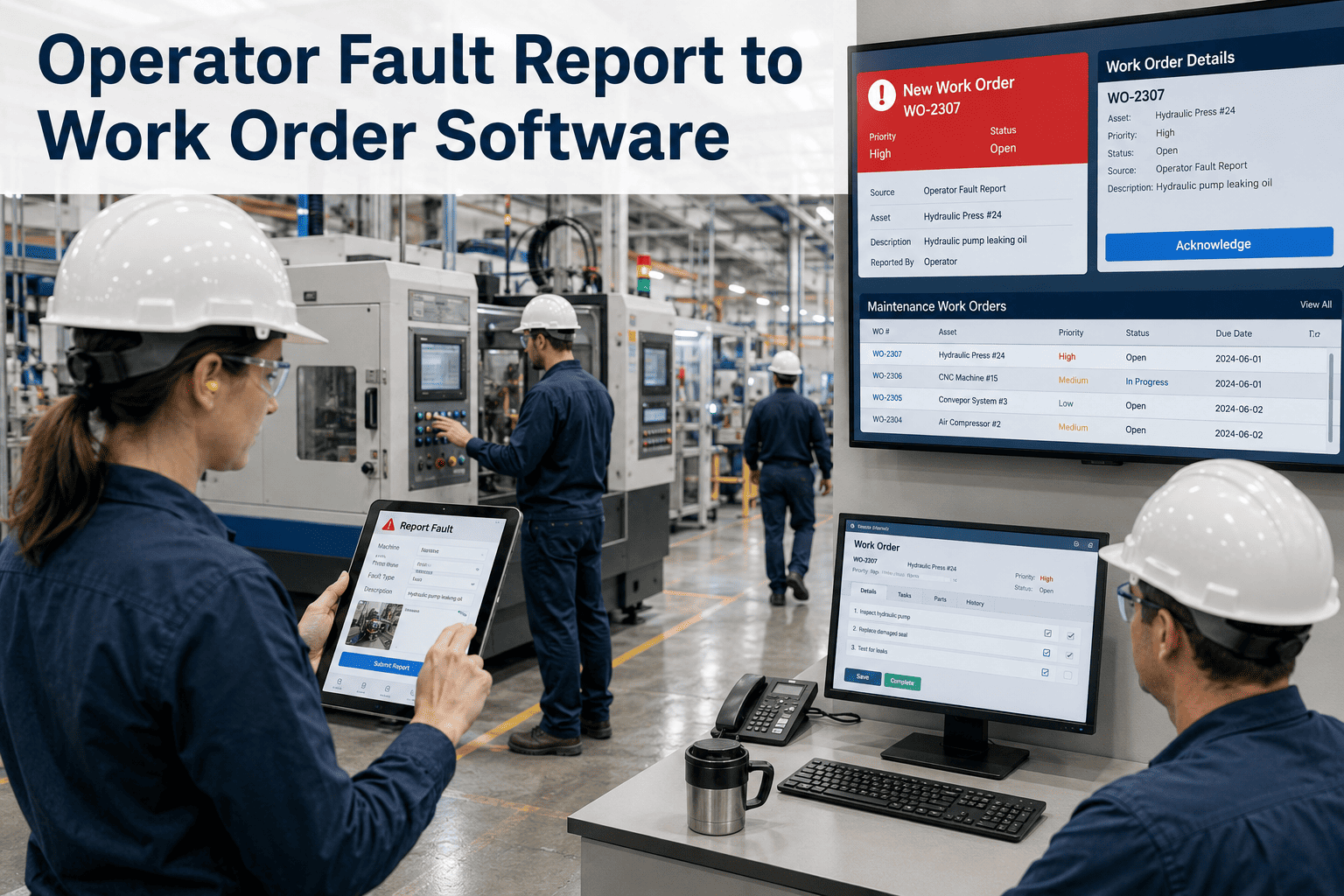
Operator Fault Report to Work Order Software
Close the Gap Between What Operators See and What Maintenance Fixes
Tablet-based fault reporting, automated CMMS work order generation, and full SLA accountability across every shift and asset.
41%
Of operator fault reports never reach a formal work order in manual systems
4.2 hrs
Median delay from observation to assigned technician without automation
73%
Reduction in repeat failures when faults are tracked with asset history
$1.6M
Average annual recovery per plant from closed-loop fault workflows
Get Your Custom Maintenance Plan
Turn Operator Eyes Into Maintenance Action
Eliminate the reporting lag that costs plants millions. See how Oxmaint routes every fault from the line operator directly to the right technician — with parts, SLA, and asset history attached.
- Real-time fault capture on tablets
- Predictive failure alerts from recurring codes
- Full SLA and accountability tracking
What Is Operator Fault Report to Work Order Software?
Operator fault report to work order software is the digital workflow that captures any abnormality an operator observes on a production line, classifies it against a fault code library, and automatically generates a CMMS work order routed to the correct maintenance team — with priority, SLA, parts, and historical context attached. It replaces the paper-form-to-supervisor-to-CMMS chain that loses 40% of reports along the way.
At its core, the system shifts maintenance from passive (wait for failure) to active (operator sees something, system acts). Every report becomes a tracked event with timestamps, photos, audio notes, and clear ownership — so nothing falls through the cracks. Want to see this on your plant floor? Start a free trial and configure your first reporting workflow in under an hour, or book a demo with a CMMS specialist.
The Closed-Loop Fault Workflow — 8 Stage Framework
01
Operator Observation
Line operator notices a fault: noise, leak, alarm, vibration, or visual defect on the asset.
02
Tablet Capture
Fault logged on shop-floor tablet with asset scan, fault code, photo, and shift context in under 60 seconds.
03
Priority Triage
System auto-assigns priority based on asset criticality, fault history, and downtime impact rules.
04
Work Order Generation
CMMS work order created automatically with parts list, technician skill match, and SLA clock started.
05
Technician Notification
Right technician receives push alert with asset location, full history, and recommended procedure.
06
Repair and Verification
Technician completes work, logs parts used, root cause confirmed, and operator notified for verification.
07
Closure with Evidence
Work order closed with photos, signatures, parts consumed, and labor hours captured for audit trail.
08
Recurring Pattern Analysis
Pareto reports surface top fault codes by asset, driving PM schedule and CapEx adjustments.
Plants lose 20-40% of maintenance budget to operator-reported faults that never reach a work order.
The Real Pain of Manual Fault Reporting
The cost of broken fault reporting is rarely visible on a single P&L line — it is buried in extra emergency repairs, missed PM windows, unjustified CapEx replacements, and the slow erosion of OEE that no one can quite explain. These are the four most expensive pain points VPs of Operations describe when they audit their current process. Ready to eliminate these? Book a demo and we will show you the exact workflow that fixes each one.
!
Reports Get Lost Between Shifts
Paper notes left on supervisor desks, verbal handovers between operators, and missed sticky-note tickets account for nearly half of all faults never reaching maintenance.
!
No Accountability or SLA Clock
Without timestamps, escalation rules, and assigned ownership, urgent faults sit for hours or days before action — and no one can be held responsible.
!
Repeat Failures Go Unrecognized
Without coded fault data tied to specific assets, the same failure mode happens repeatedly with no one connecting the dots — costing 4.8x more in emergency repair.
!
Operators Stop Reporting
When reports vanish into a black hole with no feedback, operators learn to stop reporting, accelerating equipment degradation and creating safety risk.
How Oxmaint Closes the Loop
Oxmaint provides a mobile-first, tablet-based fault reporting interface that lives on the shop floor and connects directly to the CMMS engine your maintenance team already uses. No heavy onboarding, no MES rip-and-replace, no custom integration required. Operations leaders across USA OSHA-regulated plants, UK Building Safety facilities, German precision manufacturers, and UAE Vision 2030 operations all use the same workflow. Get measurable results in the first 30 days — start a free trial and connect your first asset in minutes.
Shop-Floor Tablet Interface
Touch-friendly, multi-language fault entry screens with asset QR scan, photo capture, and voice notes for operators on the line.
Automated Priority Assignment
Rules engine auto-assigns urgency based on asset criticality scoring, downtime impact, and historical fault patterns.
Smart Technician Routing
Right technician selected automatically by skill match, current workload, location, and shift availability.
SLA and Escalation Tracking
Every work order starts an SLA clock with auto-escalation if response or resolution thresholds are breached.
Asset History at Point of Fault
Technicians see the full asset record, last 10 work orders, and recurring fault codes before arriving at the line.
Portfolio Pareto Reporting
Operations leaders get cross-site fault frequency rankings to drive PM scheduling, training, and CapEx priorities.
73% reduction in repeat failures when fault data is tied to asset history — start a free trial to see this on your operation.
Before vs After: The Fault Workflow Transformation
| Workflow Dimension |
Before — Manual Paper/Verbal Reporting |
After — Oxmaint Closed-Loop Workflow |
| Capture method |
Handwritten note, verbal handover |
Tablet form with photo, code, and timestamp |
| Reports reaching CMMS |
59% (industry average) |
100% (automated) |
| Time to work order |
4.2 hours median |
Under 90 seconds |
| Technician assignment |
Manual by supervisor |
Auto-routed by skill + location |
| SLA tracking |
None |
Per-priority SLA with escalation |
| Asset history visibility |
Searched manually if at all |
Pre-loaded with full record |
| Repeat failure detection |
Anecdotal |
Pareto by asset and code |
| Audit trail |
Incomplete paper file |
Time-stamped digital record |
| Operator feedback loop |
Rarely closed |
Auto-notify on completion |
The Measurable ROI of Closed-Loop Fault Reporting
Oxmaint customers consistently see results in the first 30-90 days — measured in throughput recovered, emergency repairs avoided, and PM schedules finally tuned to real failure data. The numbers below reflect typical outcomes across plants with 200-2,000 assets under management. Limited onboarding slots available this quarter.
100%
Fault Capture Rate
Up from 59% industry average
90 sec
Fault to Work Order
Down from 4.2 hours median
73%
Repeat Failure Reduction
From coded asset-tied fault history
$1.6M
Annual Recovery
Per plant from eliminated lost reports
31%
Lower Emergency Repair Spend
Reactive to planned shift in year one
42 days
Payback Period
For mid-sized multi-site portfolios
Frequently Asked Questions
Can operators use Oxmaint without extensive training?
Yes. Operator interfaces are designed for sub-5-minute onboarding. The fault entry workflow uses icons, asset QR scans, and voice notes — no typing required if preferred.
Does Oxmaint support multi-language plants?
Yes. The operator interface supports multiple languages including English, Spanish, German, Arabic, and others. Each operator can set their preferred language for fault entry.
Can we connect Oxmaint to our existing CMMS or ERP?
Yes. Oxmaint provides REST APIs and standard integration patterns for SAP, Maximo, and other CMMS/ERP systems. Multi-site portfolios can run Oxmaint as the operator layer over existing enterprise systems.
What hardware do we need on the shop floor?
Any modern tablet or kiosk running iOS, Android, or a browser. Many customers use rugged Samsung tablets at line stations or repurpose existing shop-floor HMIs.
Decision Point — See Measurable Results in 30 Days
Stop Letting Operator Reports Disappear
Turn every operator observation into a tracked, prioritized work order with full SLA accountability. No heavy implementation. Works across multi-site portfolios. Live in days, not months.