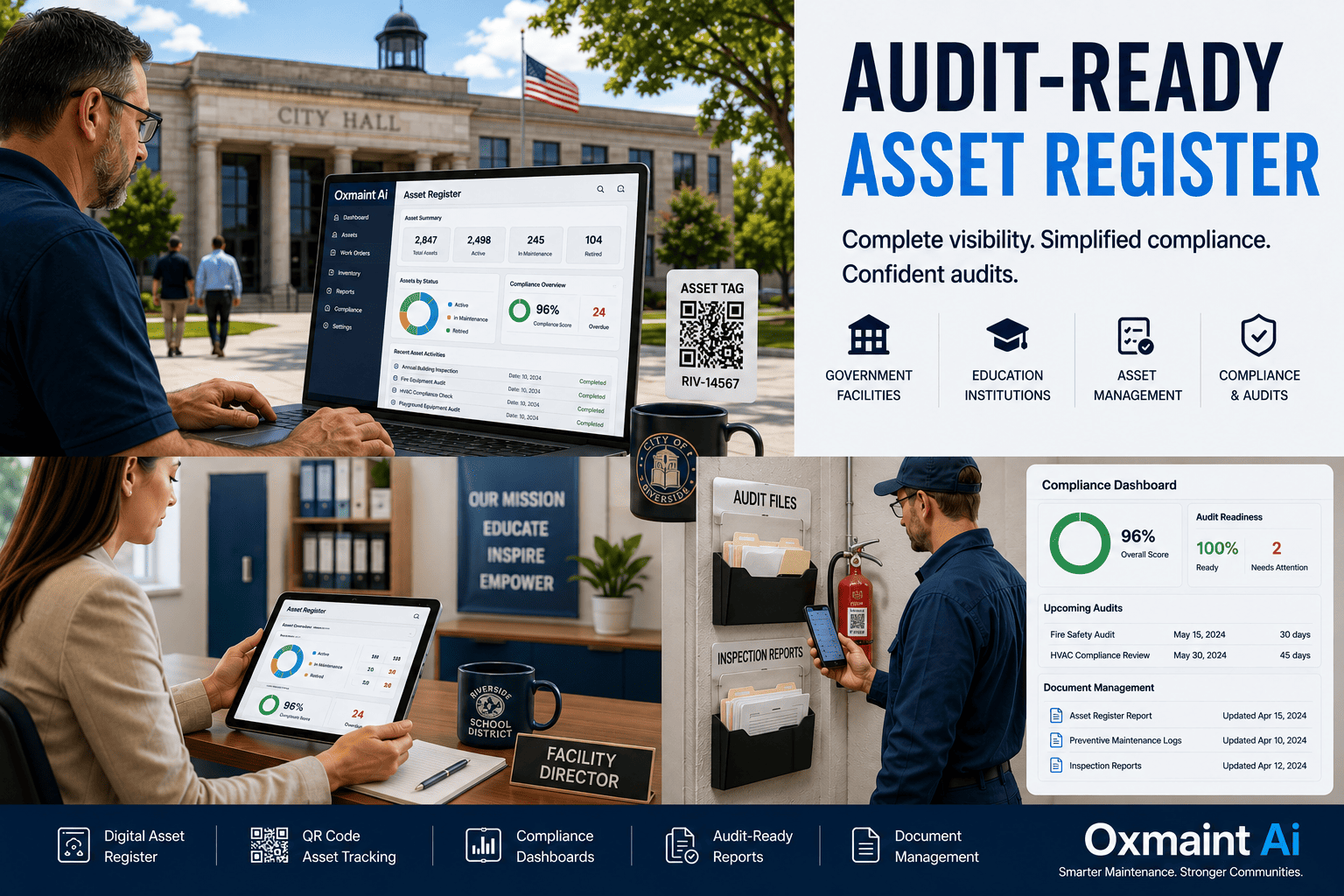
Public school districts, municipal facilities teams, and government agencies operate some of the largest and most diverse asset portfolios in the country — HVAC systems across hundreds of classrooms, generators at emergency response facilities, vehicle fleets across multiple depots, and decades of capital equipment that may or may not still exist on the floor. When the auditor arrives — state controller, federal grant auditor, GASB 34 compliance reviewer, internal inspector general — the question is always the same: where is the asset, what is its current condition, and can you prove it? Most education and government teams cannot answer cleanly because their asset records live across three spreadsheets, two legacy databases, and the institutional memory of a long-tenured custodian who retired last year. Oxmaint consolidates every asset into a single audit-ready register with condition scoring, location tracking, lifecycle history, and the documentation auditors actually ask for — start a free trial to import your existing asset list and generate an audit-ready register, or book a 30-minute demo to walk through a multi-site district or agency setup.
See how districts and agencies are passing audits with zero last-minute scramble.
- One asset register across every school, depot, and facility
- GASB 34 and grant-compliance documentation built in
- QR/barcode asset tagging with mobile inspection capture
Sector Snapshot
Education and Government Asset Management by the Numbers
$1.1T
US K–12 capital asset inventory under management
National Center for Education Statistics, 2023
60%+
Districts cite incomplete asset records at audit
ASBO benchmark, 2024
GASB 34
Mandates condition-based asset reporting
Governmental Accounting Standards Board
120 hr
Average audit prep time saved per cycle
Public sector CMMS deployments, 2024
Definition
What is an Audit-Ready Asset Register?
An audit-ready asset register is a centralized, condition-tracked inventory of every physical asset under your agency's or district's control — buildings, HVAC equipment, vehicles, technology, generators, kitchen equipment, athletic facilities, and capital improvements — recorded with enough detail and history that any auditor, grant administrator, or accounting standards reviewer can verify the asset exists, locate it physically, confirm its condition, and reconcile it against your financial statements without you having to scramble.
For education and government teams, the "audit-ready" qualifier matters more than the register itself. A spreadsheet is a register. A registry that satisfies GASB 34 condition reporting, supports federal grant compliance, and holds up to state controller scrutiny is something different — and most districts and agencies do not have one. Start a free trial to consolidate your existing records into a single audit-ready register, or book a demo to see how a multi-school district structures Oxmaint.
Framework
The Six Pillars of an Audit-Ready Public-Sector Asset Register
Pillar 01
Unique Asset Identification
QR/barcode tags tied to a permanent asset ID — survives transfers, renovations, and staff turnover without breaking the audit trail.
Pillar 02
Location and Custody Tracking
Building, room, custodian, and use-type captured so an auditor can physically locate any asset on request.
Pillar 03
Condition Scoring
Standardized 1–5 condition rating updated at every inspection, supporting GASB 34 modified approach reporting.
Pillar 04
Acquisition and Funding Source
Purchase date, cost, funding source (general fund, grant, bond, federal) tied to each asset for grant compliance.
Pillar 05
Maintenance and Inspection History
Every work order, inspection, and repair logged against the asset record — full lifecycle visibility on demand.
Pillar 06
Disposal and Retirement Trail
Auction records, transfers, and retirements documented so removed assets reconcile against financial statements.
A single inventory gap during a federal grant audit can trigger clawback of the entire grant — turning a missed asset record into a six-figure budget hit.
Signature Lifecycle
The Asset Lifecycle Ring — Five Stages, One Register
01
Acquire
Asset added with funding source, cost, location, and warranty documentation at procurement.
02
Tag and Locate
QR/barcode applied, photo captured, location confirmed, custodian assigned — register entry locked.
03
Operate and Maintain
PMs, inspections, and work orders logged against asset ID across the full useful life.
04
Score and Report
Condition rating updated, GASB 34 reports auto-generated, grant compliance docs exported.
05
Retire and Reconcile
Disposal documented, financial reconciliation logged, audit trail preserved for retention period.
Operational Pain Points
Why Education and Government Teams Fail Asset Audits
Three-Spreadsheet Reality
Facilities keeps one list, finance keeps another, IT keeps a third — and none of them reconcile. The auditor finds a generator that appears in two systems with different values.
Ghost Assets and Phantom Records
Equipment that left the property years ago still appears on the books. Assets in active use have never been registered. Both fail the audit, in opposite directions.
Grant Source Untracked Per Asset
Federal Title funding, state bond funding, and general fund purchases get mixed together — when a grant auditor pulls a sample, the funding source cannot be traced.
No Condition Scoring for GASB 34
Modified-approach reporting requires consistent condition assessment, but most districts have never standardized a scale — every auditor visit becomes a manual reconstruction.
Disposal Records Lost or Missing
When equipment is auctioned, transferred, or scrapped, the paper trail rarely makes it back to the asset register — financial reconciliation falls apart at year-end.
Audit Prep Becomes a 120-Hour Fire Drill
Every audit cycle, two staff members get pulled off their regular work for three weeks to reconstruct records that should have lived in one system all along.
Districts and agencies running structured registers in Oxmaint typically cut audit prep time by 70–85% — start a free trial to import your current asset list and measure the gap, or book a demo to walk through your audit cycle.
The Solution
How Oxmaint Builds the Audit-Ready Register
Portfolio-to-Component Hierarchy
District to Property to System to Asset to Component — a structure that maps cleanly to how auditors and grant administrators ask for data.
QR and Barcode Asset Tagging
Print tags on standard label stock, scan with any phone, locate any asset in seconds — the physical-to-digital link auditors verify.
Standardized Condition Scoring
Built-in 1–5 condition rating with definitions per asset class — GASB 34 modified-approach reporting becomes a report export, not a project.
Funding Source per Asset
Tag each asset with the grant, bond, or fund that paid for it — when a federal auditor samples for compliance, the trail is one click away.
Mobile Inspection Capture
Custodians and facilities staff complete inspections on their phones with photo evidence — condition updates flow directly into the register.
Audit Report Generation
Export complete asset listings filtered by site, condition, fund source, or inspection date — auditor walks in, report walks out.
Replace a 120-hour audit fire drill with a 20-minute report export — without changing how your custodians and facilities staff already work.
Before vs After
Spreadsheet Register vs Oxmaint Register
| Capability |
Spreadsheet Register |
Oxmaint Register |
| Asset Identification |
Asset numbers manually entered, often duplicated or skipped |
Unique permanent IDs auto-generated, QR-tagged, never duplicated |
| Location Tracking |
Last known location, often outdated, no audit trail of moves |
Building, room, custodian tracked with timestamped move history |
| Condition Scoring |
Subjective notes, inconsistent across staff and audit cycles |
Standardized 1–5 GASB 34 scale with mobile inspection capture |
| Grant Funding Source |
Tracked in finance system, disconnected from asset record |
Tagged at acquisition, traceable on every audit sample |
| Maintenance History |
Lives in work order log, not linked to asset register |
Every work order, PM, and inspection tied to asset ID |
| Disposal Trail |
Paper-based, often lost between facilities and finance |
Disposal workflow captures auction or transfer records electronically |
| Audit Report Generation |
2–3 weeks of manual reconstruction per audit cycle |
On-demand export by site, fund, condition, or date in minutes |
| Multi-Site Visibility |
One spreadsheet per site, no rollup, district-level blind spots |
District-wide dashboard with site and asset-class drill-down |
Measured Outcomes
ROI of an Audit-Ready Asset Register
70–85%
Audit Prep Time Saved
Per audit cycle, district and agency average
120 hr
Staff Hours Recovered
Per annual audit, mid-size district
$0
Grant Clawback Risk Avoided
When funding source is documented per asset
8–15%
Ghost Asset Removal
Phantom equipment cleared off the books
100%
GASB 34 Compliance
Modified-approach reporting standardized
2–4 wk
Time to Live Register
From kickoff to first audit-ready export
A clean asset register is the difference between an audit that ends in a clean letter and one that triggers a finding — start a free trial to begin the migration, or book a demo to see the GASB 34 reporting in action.
Frequently Asked Questions
Common Questions on Public-Sector Asset Registers
Does Oxmaint support GASB 34 modified-approach condition reporting?
Yes. Oxmaint includes a standardized 1–5 condition scale with definitions per asset class, mobile inspection capture, and export reports formatted for GASB 34 modified-approach disclosure. Districts and agencies using the modified approach can pull the required condition assessment data directly from the register.
Can we import our existing asset spreadsheet to get started?
Yes. Most education and government customers begin by importing their current spreadsheet or legacy database directly into Oxmaint. The platform handles standard CSV and Excel imports, maps fields to the asset hierarchy, and flags duplicates and gaps in the import preview before commit.
How does Oxmaint handle multiple school sites or facility locations?
Multi-site is the default architecture. Districts structure their portfolio as district to property (school or facility) to system to asset to component. Dashboards roll up by site, region, or asset class, and role-based access controls let site staff see only their location while district admins see the full portfolio.
What does it take to roll Oxmaint out across a multi-school district?
Typical district rollouts run two to four weeks from kickoff to a working register. Steps are: asset import, hierarchy configuration, QR tag printing and labeling, mobile rollout to custodians and facilities staff, and audit report template setup. No heavy IT integration is required to start.
Build Your Audit-Ready Asset Register
Stop Reconstructing Records Every Audit Cycle
Turn every asset in your district or agency into a documented, tracked, audit-ready record with Oxmaint.
- One register across every school, depot, and facility
- GASB 34 condition reporting built in
- Grant funding source tracked at the asset level
Live in 2–4 weeks. Works across multi-site districts and agencies. No heavy IT implementation.