Maintenance teams managing thousands of assets across multiple sites face a brutal reality: the wrong CMMS choice wastes 6-12 months in failed implementation, burns through licensing budgets, and leaves operations still drowning in reactive work orders. With over 100 CMMS platforms flooding the 2026 market, selecting software based on marketing promises rather than verified capabilities costs operations tens of thousands in sunk costs and lost productivity. The global CMMS market doubled from $1.46 billion in 2025 to an expected $3.8 billion by 2034, driven by 65% of maintenance teams planning AI adoption by end of 2026. This comparison evaluates the top 10 CMMS platforms across transparent pricing, mobile usability, AI automation depth, implementation speed, and verified user satisfaction to help you invest in the right system from day one. Start a free trial and compare OxMaint against every platform on this list in under 2 minutes.
$3.8B
Global CMMS Market 2034
Market value expected to more than double from $1.46B in 2025, driven by shift from reactive to predictive maintenance
65%
Teams Adopting AI by 2026
Maintenance organizations plan to implement AI-powered predictive tools, up from just 30% with full AI deployment today
25%
Cost Reduction Potential
Predictive maintenance cuts costs by 25% while boosting equipment uptime 10-20% compared to reactive strategies
59%
Facilities Using CMMS
Nearly 6 in 10 facilities already deployed CMMS, with adoption accelerating as digital transformation becomes mandatory
See Why Maintenance Teams Choose OxMaint Over Legacy CMMS
OxMaint delivers AI-powered work order automation, predictive scheduling, and real-time asset tracking without the 6-month implementation cycles or hidden fees that plague enterprise CMMS platforms. Get started in minutes, not months, with transparent pricing and no vendor lock-in. Compare OxMaint side-by-side with MaintainX, UpKeep, Fiix, and Limble to see the difference.
What Is CMMS Software and Why Does It Matter in 2026?
A Computerized Maintenance Management System centralizes every operational aspect of maintenance into a single digital platform: work orders, asset records, preventive maintenance schedules, spare parts inventory, compliance documentation, and technician assignment. Modern CMMS platforms replaced the spreadsheet chaos that causes work orders to slip through cracks, unplanned downtime to spiral out of control, and reactive firefighting to dominate maintenance strategy. In 2026, the dividing line between basic CMMS and next-generation platforms is AI capability. Systems that embed predictive analytics, automated work order generation, and condition-based scheduling natively outperform bolt-on solutions that charge premium fees for limited AI features. Book a demo to see how OxMaint's AI engine predicts failures before they occur.
01
Work Order Management
Digital request-to-completion workflow that tracks every maintenance task from creation through technician assignment, parts procurement, labor hours, and final sign-off. Eliminates paper work orders, prevents tasks from falling through cracks, and creates audit trails for compliance.
02
Preventive Maintenance Automation
Time-based, meter-based, or condition-based scheduling that auto-generates PM tasks before equipment fails. Shifts maintenance from reactive breakdowns to planned interventions, reducing emergency repairs by 40-60% and extending asset life by preventing catastrophic failures.
03
Asset Lifecycle Tracking
Complete digital record for every asset: purchase date, warranty status, maintenance history, downtime logs, replacement cost, and depreciation schedule. Enables data-driven CapEx forecasting and prevents premature replacement of assets that still have useful life remaining.
04
Spare Parts Inventory Control
Real-time visibility into parts stock levels, automatic reorder triggers when inventory drops below minimums, and parts-to-asset mapping that tells you exactly which equipment requires which components. Prevents stockouts that extend downtime and reduces excess inventory carrying costs.
05
Mobile Field Access
Smartphone and tablet apps that give technicians access to work orders, asset histories, technical documentation, and parts information from anywhere on the facility floor. Eliminates trips back to the office for paperwork and enables offline work in areas without network coverage.
06
Predictive Analytics and AI
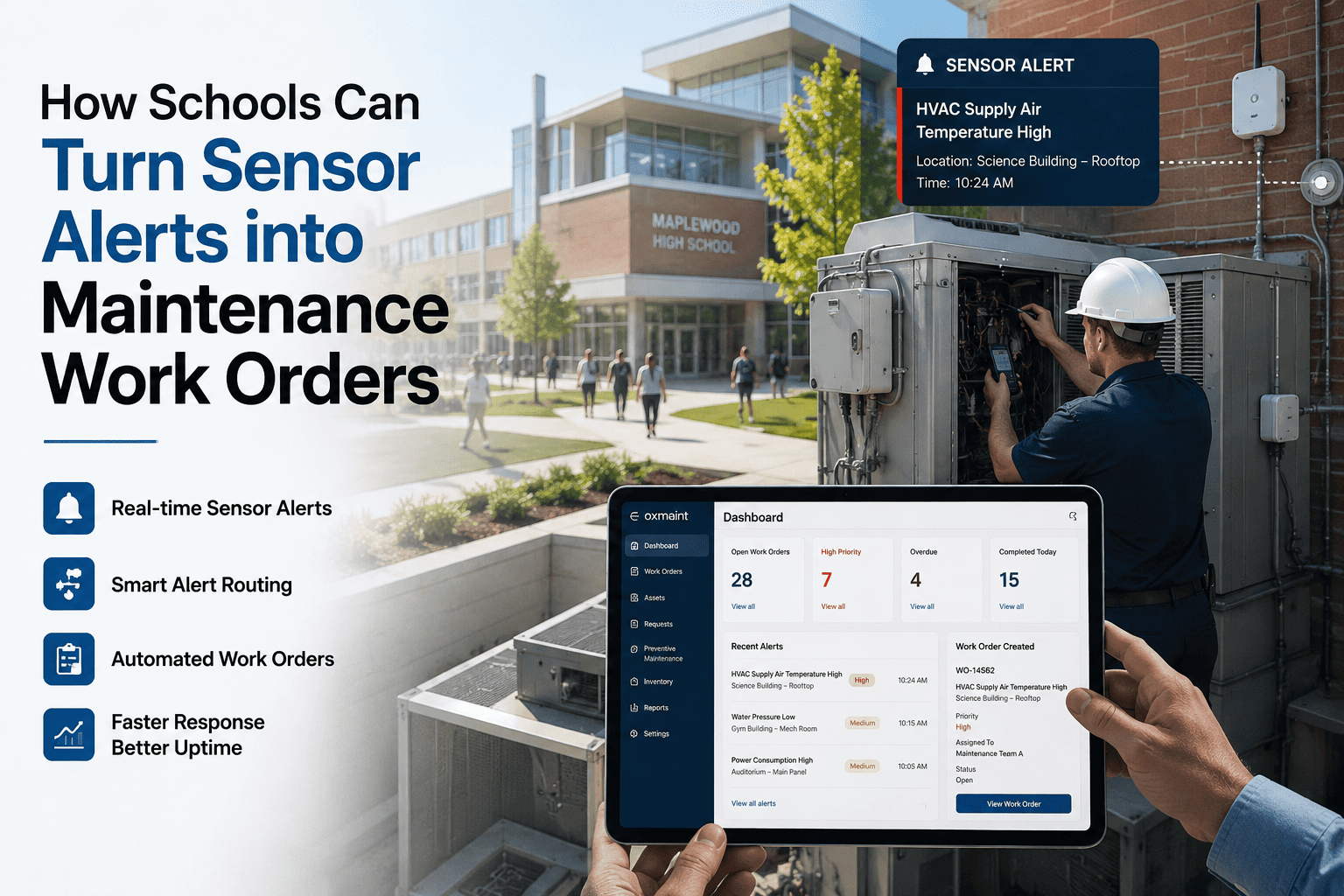
Machine learning models analyze equipment vibration, temperature, runtime, and performance trends to forecast breakdowns days or weeks before failure. AI auto-generates work orders, assigns them based on technician skills and availability, and prioritizes tasks by asset criticality without human intervention.
Top 10 CMMS Platforms: Complete Comparison
This comparison evaluates platforms based on five weighted criteria: AI automation depth, mobile usability, implementation speed, pricing transparency, and verified user reviews across G2, Capterra, and industry forums. Every platform was assessed on real-world workflows, total cost of ownership, and how quickly teams can move from signup to productive use. Pricing data reflects 2026 published rates, though enterprise contracts often negotiate custom terms.
Key Features to Evaluate in CMMS Software
Not all CMMS platforms deliver equal value across critical functionality. These eight features separate production-ready systems from glorified spreadsheet replacements. Evaluate each carefully based on your operation's specific workflows, team size, and growth trajectory.
WO
Work Order Management
Digital workflow from request creation through technician assignment, parts procurement, labor tracking, and completion sign-off. Must support priority levels, custom fields, photo/video attachments, and audit trails. Look for automated assignment based on skills, automatic routing based on asset type, and mobile accessibility for field updates.
PM
Preventive Maintenance Scheduling
Automated task generation based on calendar time (weekly, monthly), meter readings (hours, mileage, cycles), or conditional triggers (temperature, vibration). Essential capabilities include nested PMs for complex procedures, PM history tracking, and ability to suspend/resume schedules without losing configuration.
AI
Predictive Analytics and AI
Machine learning models that analyze equipment data patterns to forecast failures before they occur. Best systems auto-generate work orders when predictions exceed thresholds, prioritize tasks by asset criticality, and continuously improve accuracy as they learn from outcomes. AI should be included, not premium add-on.
AS
Asset Management and Tracking
Complete digital record for every asset: specifications, purchase date, warranty status, location, parent/child relationships, maintenance history, downtime logs, and total cost of ownership. Must support asset hierarchies (building - floor - room - equipment - component), custom fields, and document storage.
INV
Parts Inventory Control
Real-time stock tracking with minimum/maximum levels, automatic reorder points, parts-to-assets mapping, and usage history. Advanced systems link parts consumption to work orders, calculate inventory carrying costs, and identify slow-moving stock for reduction. Barcode/QR scanning essential for accuracy.
MOB
Mobile Functionality
Native iOS and Android apps built for technician workflow, not scaled-down desktop versions. Must work offline with automatic sync when connection restores, support barcode scanning, enable photo/video capture, and provide full work order access. Test mobile UX before committing, not just feature list.
IoT
IoT and Sensor Integration
Connect real-time equipment data from vibration sensors, temperature monitors, flow meters, and energy tracking devices directly into CMMS. Condition-based maintenance triggers auto-generate work orders when sensor readings exceed thresholds. Look for pre-built integrations, not custom development requirements.
RPT
Reporting and Analytics
Customizable dashboards showing KPIs like mean time between failures, planned vs reactive maintenance ratio, work order completion rates, and cost per asset. Export capabilities, scheduled report delivery, and drill-down from summary to detail essential for data-driven decisions.
CMMS Pricing Models: Hidden Costs to Watch
Published per-user pricing tells only part of the cost story. Total cost of ownership includes implementation fees, training charges, data migration costs, integration development, per-asset charges, and premium feature modules. Some vendors hide true costs behind mandatory sales calls, while others frontload expenses in lengthy onboarding. Understanding pricing structures prevents budget surprises six months into deployment. Start free with OxMaint's transparent pricing - no hidden fees, no annual lock-in, all features included.
Subscription-Based (Most Common)
Monthly or annual fees per user or per asset. Cloud-hosted with automatic updates.
Watch for: Mandatory annual contracts, price increases after year one, extra charges for support or training, minimum user commitments.
Tiered Pricing
Basic, Professional, Enterprise tiers with features locked by plan level.
Watch for: Essential features (AI, mobile, integrations) reserved for expensive tiers, forced upgrades to access needed functionality.
Per-Asset Pricing
Charges based on number of assets tracked rather than users.
Watch for: Unclear asset counting (does component count separately?), escalating costs as portfolio grows, penalties for exceeding limits.
Implementation Fees
One-time charges for setup, data migration, configuration, and initial training.
Watch for: Costs exceeding $10K-$100K+ for enterprise platforms, 3-12 month deployment timelines, ongoing consulting charges.
Integration Charges
Fees for connecting CMMS to ERP, IoT sensors, or other enterprise systems.
Watch for: Custom development requirements, per-integration pricing, API access limited to expensive tiers, ongoing sync maintenance fees.
Premium Add-Ons
AI analytics, advanced reporting, multi-site management sold separately.
Watch for: Core features marketed as premium extras, modular pricing that doubles total cost, essential functionality requiring upgrades.
Small Business vs Enterprise CMMS: Which Do You Need?
The right CMMS scales with your operation rather than forcing you to conform to its structure. Small teams managing single facilities have different requirements than enterprises coordinating maintenance across dozens of sites. Choosing enterprise software for a 5-person team wastes budget on unused features, while deploying small-business CMMS across 50 sites creates operational chaos.
Priority Features
Simple work order creation and tracking
Calendar-based preventive maintenance
Basic asset records and histories
Mobile app for field access
Fast setup under 1 week
Typical Budget
$0-$500 per month total cost
Best Platforms
OxMaint, Limble, Hippo, Maintenance Care
Priority Features
Multi-site consolidated reporting
ERP and financial system integration
Advanced analytics and AI predictions
Complex workflow automation
Role-based access controls
Typical Budget
$5K-$50K+ per month, $100K+ implementation
Best Platforms
OxMaint, Fiix, IBM Maximo, eMaint Enterprise
How to Choose the Right CMMS for Your Operation
CMMS selection fails when teams evaluate features in isolation rather than assessing how the system behaves in actual workflow. The platform that looks best in demo screenshots often collapses under real-world use. Follow this decision framework to match CMMS capabilities to your operational reality.
Step 1
Map Your Current Workflow
Document how work requests currently turn into completed work orders, who approves what, where information gets lost, and which manual steps waste time. CMMS should streamline this flow, not force you to redesign proven processes.
Step 2
Identify Non-Negotiable Requirements
Separate must-have capabilities from nice-to-have features. Mobile offline access may be essential for manufacturing but irrelevant for office buildings. Multi-site reporting critical for portfolios but overkill for single facilities.
Step 3
Test Mobile Experience First
Technicians spend more time in mobile app than managers spend in desktop interface. Poor mobile UX kills adoption regardless of desktop features. Test work order creation, photo upload, barcode scanning, and offline sync with actual devices.
Step 4
Calculate Total Cost of Ownership
Add per-user fees, implementation costs, training charges, integration development, data migration, and ongoing support for realistic 3-year total. Platforms with hidden costs often double advertised pricing.
Step 5
Verify Implementation Timeline
Systems promising 6-month deployments often stretch to 12+ months, delaying ROI and frustrating teams. Prioritize platforms with proven rapid implementation, ideally under 30 days to productive use.
Step 6
Check User Reviews from Similar Operations
G2, Capterra, and industry forums reveal real-world performance issues vendors won't disclose. Filter reviews by company size and industry to find feedback from comparable users, not cherry-picked testimonials.
Frequently Asked Questions
What is the average cost of CMMS software in 2026?
CMMS pricing ranges from free basic plans to $100+ per user per month for enterprise platforms. Mid-market systems typically cost $45-$75 per user monthly. However, total cost of ownership includes implementation fees ($5K-$100K+), training, data migration, and integration development. Small operations (under 10 users) can deploy quality CMMS for $500-$2,000 annually, while enterprises often spend $50K-$500K+ yearly including all costs.
Start free with OxMaint and upgrade only when you need advanced features.
How long does CMMS implementation typically take?
Implementation timelines vary dramatically by platform complexity and organization size. Modern cloud-based systems like OxMaint, Limble, and UpKeep can go live in 1-7 days for small teams with basic needs. Mid-market deployments typically require 30-90 days including data migration, workflow configuration, and training. Enterprise platforms like IBM Maximo, SAP, or Infor often take 6-12+ months to implement fully, involving extensive customization, integration development, and change management. Teams moving from spreadsheets generally deploy faster than those migrating from legacy CMMS systems.
Do I need AI-powered predictive maintenance features?
AI delivers measurable value when you have equipment data to analyze and consequences of failure justify the investment. Operations managing critical assets (manufacturing lines, data centers, utilities) benefit significantly from AI predictions that prevent catastrophic downtime. However, small facilities with simple equipment may achieve better ROI from reliable preventive maintenance rather than advanced analytics. Key factors: Do you have IoT sensors or can install them? Are unplanned failures costing you more than planned maintenance? Can you act on predictions fast enough to prevent failures? If yes to all three, AI-powered CMMS justifies the investment.
Book a demo to see OxMaint's AI in action with your equipment data.
Can CMMS integrate with our existing ERP or accounting system?
Most modern CMMS platforms offer integration capabilities, but implementation complexity varies significantly. Basic integrations (work order costs to accounting) are standard via pre-built connectors for QuickBooks, Xero, NetSuite, and similar systems. Advanced integrations (synchronized asset records, automated purchasing, labor cost allocation) often require custom development, API access restricted to premium tiers, or third-party middleware like Zapier. Before committing, request proof of existing integration with your specific ERP version, not general compatibility claims. Implementation costs for complex integrations can exceed $10K-$50K beyond base CMMS pricing.
What is the difference between CMMS and EAM software?
CMMS (Computerized Maintenance Management System) focuses specifically on maintenance operations: work orders, preventive schedules, parts inventory, and technician assignment. EAM (Enterprise Asset Management) encompasses broader asset lifecycle from procurement through depreciation, including financial management, capital planning, compliance tracking, and strategic decision-making. For most operations, CMMS provides sufficient functionality. EAM becomes necessary when you need integrated financial analysis, complex asset hierarchies across multiple business units, or regulatory compliance reporting beyond basic maintenance records. Many vendors blur these distinctions in marketing; evaluate actual features rather than category labels.
How do I migrate data from spreadsheets to CMMS?
Data migration success depends on current spreadsheet organization and CMMS import capabilities. Start by cleaning existing data: standardize asset names, remove duplicates, complete missing fields, and organize into structured tables matching CMMS format. Most platforms provide CSV import templates specifying required columns and data formats. Migration typically proceeds in phases: assets first (creating foundation), then PM schedules, followed by parts inventory, and finally historical work orders if needed. Quality platforms offer import assistance, data validation, and bulk edit tools to fix issues post-import. Budget 20-40 hours for thorough migration of 100-500 assets including cleanup and verification.
OxMaint provides free migration support including spreadsheet templates and import guidance.
Stop Researching. Start Maintaining.
OxMaint gives you AI-powered predictive maintenance, automated work orders, and real-time asset tracking without the 6-month implementation nightmares or hidden enterprise fees. Free plan includes full core features. Paid tiers start at $8 per user monthly with no annual contracts and all AI capabilities included. Set up your first work order in the next 90 seconds.